
Reading is not writing. If you just want to look up a note, skim a document or view a .md file someone sent you, you don’t need an editor with plugins, vaults and sync. You need a program that starts instantly, shows the file and then stays out of the way.
That’s exactly what I built mdVü for. It has been on GitHub as a public beta for a few days now, and the most important thing is still missing: people who try it out.
I use Obsidian very heavily. My main vault keeps growing and now has more than 5000 pages. Obsidian is still damn fast for everything it does, but starting the program takes ages. That’s certainly also down to the many plugins. When you just want to look something up quickly, it gets a bit annoying. And conceptually Obsidian is built around vaults, so you can’t simply open an arbitrary Markdown file.
Why yet another Markdown program?
Most Markdown tools are editors, and many of them ship a complete web browser. That’s perfectly fine for writing; Obsidian, Typora and VS Code are great programs. But just to view a file, they carry a lot of weight around: startup time, memory, background processes.
mdVü isn’t meant to replace these programs but to complement them. It’s the tool for a quick look: double-click in Explorer, read, done.
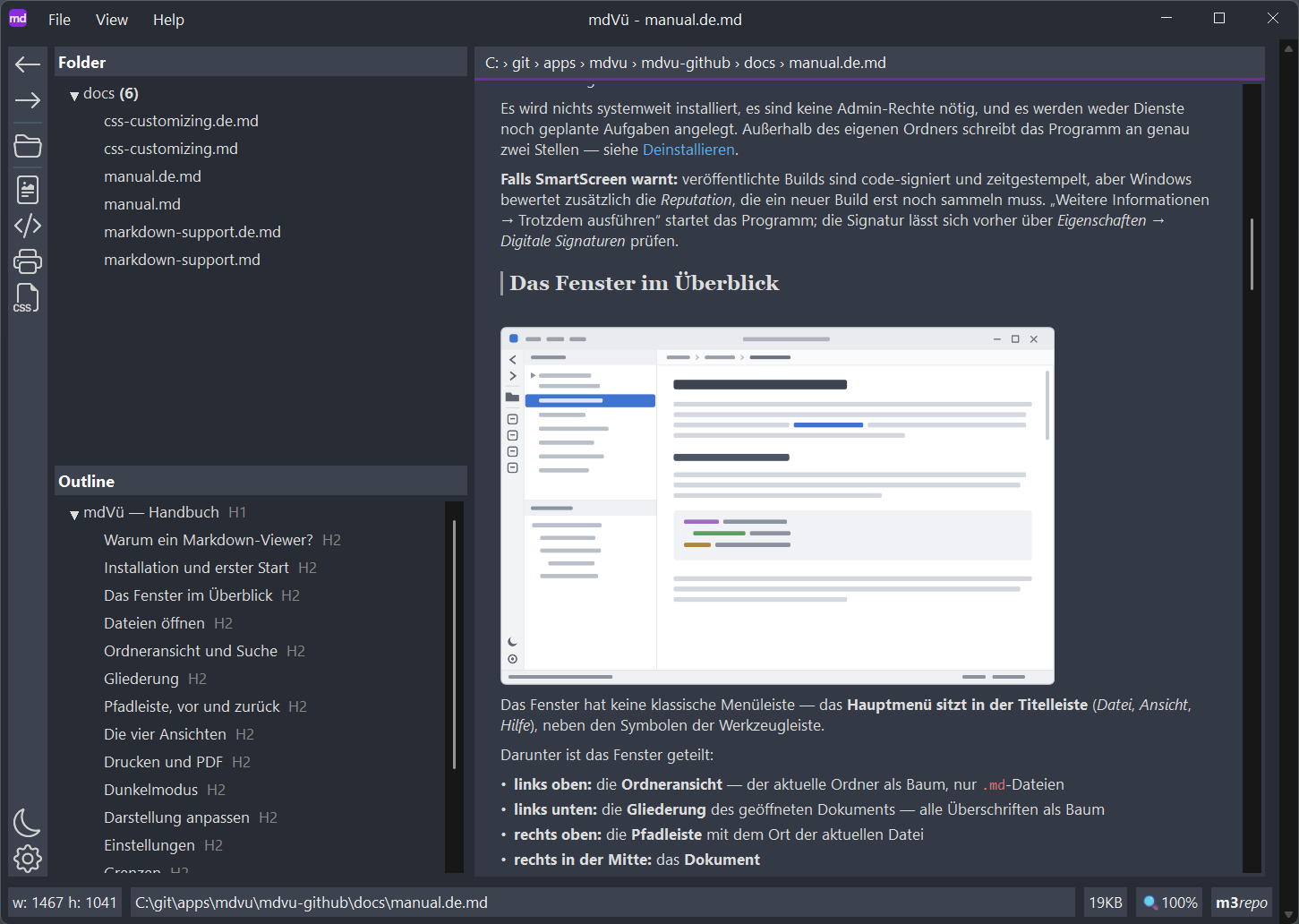
Small, fast and frugal
- A single EXE of about 15 MB. No installer, no .NET, no runtime, no browser engine. Copy the file anywhere and run it.
- Native and fast. mdVü is a real Windows application with its own layout engine. Even large documents open without noticeable delay.
- Little memory. Without Chromium under the hood, mdVü needs only a fraction of what browser-based editors take up. With a 300 KB test file (about 70 pages printed), mdVü uses just 40.5 MB of RAM according to Task Manager.
The heart of it: printing and PDF
This is what I’m proudest of. Getting Markdown onto paper cleanly is surprisingly often a detour via the browser or a PDF printer driver, and the result rarely looks good.
In mdVü, the print preview for a hundred-page document is there practically instantly. Wide tables are automatically fitted to the page width, and page breaks avoid orphaned headings. Since version 0.9 there is a page setup right in the preview: printer, paper size (A3 to A6, Letter, Legal) and portrait or landscape. Preview, printout and PDF always show exactly the same thing.
The PDF export creates a real vector PDF with selectable text and a bookmark tree built from the document’s headings, straight from the program, no detours.
What else is in there
| Formats | GitHub Flavored Markdown, plus Obsidian callouts, wikilinks and image embeds |
| Folder view | Tree of the current folder with live updates and filter-as-you-type |
| Outline | All headings as a tree, one click jumps to the spot |
| Navigation | Back/forward like in a browser, clickable path bar, working links between documents |
| Dark mode | For the interface and the document; print and PDF deliberately stay light |
| Custom look | A user.css is layered over the built-in stylesheet |
| Auto-reload | If another program changes the open file, mdVü reloads it and keeps the scroll position |
Offline and quiet
mdVü contains no network code whatsoever. No telemetry, no update checks, no account. Your documents never leave your computer.
That’s not just a promise: before every release, a script checks the EXE’s DLL imports against a versioned list. If a network DLL ever sneaked in unnoticed through a new library, it would be caught before signing. Every published EXE is code-signed, and each release page lists the SHA-256 checksum and the VirusTotal report.
A note on Windows SmartScreen: for a freshly released program, a warning may still appear despite a valid signature. It only goes away once the signature has collected enough downloads and thus “reputation”. Every tester helps with that, too.
I’m looking for beta testers
mdVü is free and has already been through a lot of internal testing. But I know my own files, and that’s exactly why I need yours:
- Download the current version from the release page on GitHub.
- Try it with your own Markdown files: notes, documentation, long texts, tables, everything.
- Report whatever gets stuck, is missing or feels wrong as an issue on GitHub. For crash logs or anything that shouldn’t be public, you can also send an email to
mdView@outlook.de.
You need Windows 10 or 11. The manual is built into the program (F1) and is available in more detail in the repository.
I’m happy about any feedback, especially now, while everything is still easy to change.